Summary
- Choosing residency scheduling software comes down to one key decision: do you want to operate the tool yourself (DIY) or have the schedule built for you (managed service)?
- Most self-service tools have a steep learning curve and require manual ACGME rule configuration, a major challenge with annual chief resident turnover.
- This guide compares 9 top tools, breaking down their operating models, ACGME compliance features, and learning curves to help you find the right fit.
- For programs looking to eliminate hundreds of hours of work, a managed service like Scheduling Wizard delivers finished, optimized, and ACGME-compliant schedules without requiring you to learn new software.
If you've ever sat down to build a residency block schedule, you already know the feeling. It's "a painful and tedious process" — as one chief resident put it — involving fragile spreadsheets, dozens of exceptions, and a sinking sense that one wrong cell formula could blow up three months of planning. Another resident summed it up perfectly: "I'm using Excel with a couple of self-written scripts but still it's the most annoying shit."
The good news: there are real solutions beyond Excel. The more nuanced news: not all solutions are built the same way, and the right choice depends heavily on which camp you fall into.
Camp 1 — The DIY Operator: You want to run the software yourself. You're willing to invest a few days (or weeks) upfront to learn a tool, configure rules, and manage the schedule on an ongoing basis. You want control.
Camp 2 — The Delegation Seeker: You want someone else to build the schedule for you. You don't have the bandwidth to learn new software, you're inheriting scheduling responsibilities mid-cycle, or you're tired of institutional knowledge walking out the door every time a new chief rotates in.
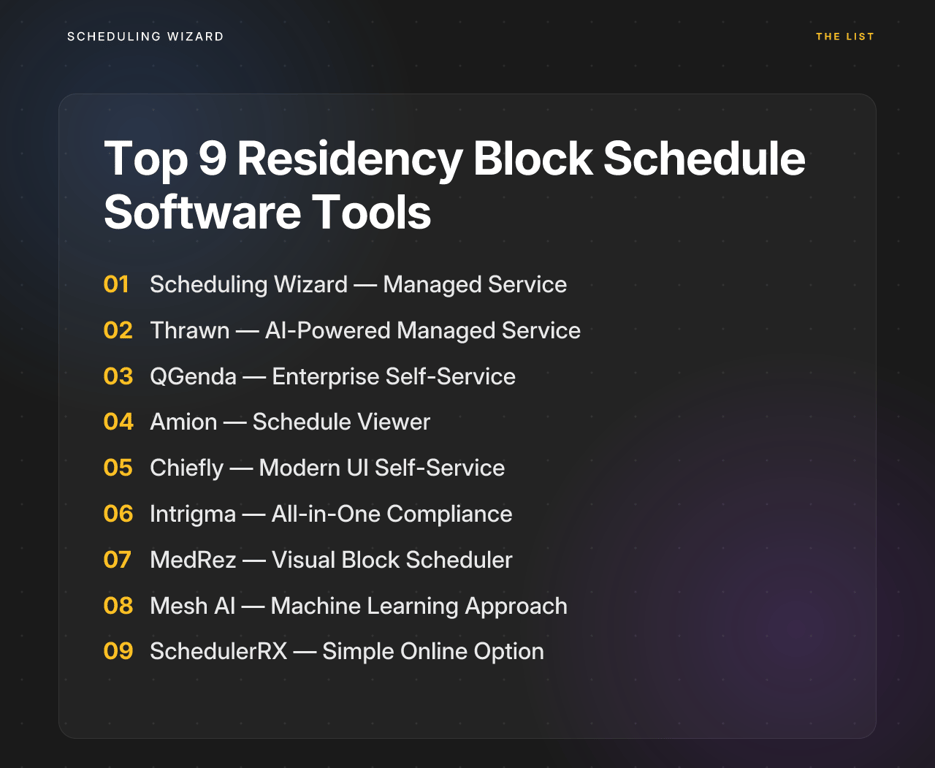
This guide covers the top 9 residency block schedule software tools — 7 self-service platforms and 2 done-for-you managed services — with an honest breakdown of ACGME compliance, learning curve, specialty support, and price transparency (or lack thereof).
1. Scheduling Wizard — The Done-For-You Managed Service
Best For: Chief residents, program directors, and GME coordinators who want to eliminate the scheduling burden entirely and receive a finished, optimized, ACGME-compliant schedule.
Scheduling Wizard is the only tool on this list that isn't software in the traditional sense. It's a managed scheduling service — meaning you don't log into a platform and build anything. Instead, you submit your constraints (rotation requirements, vacation requests, program-specific rules, subspecialty coverage needs), and Scheduling Wizard's team uses a proprietary constraint-solving engine to produce complete Block, Clinic, Call, and Attending schedules, delivered as ready-to-use Excel spreadsheets.
This is a fundamentally different model from every other tool on this list, and it solves a fundamentally different problem.
Key Features:
- No software to learn. Zero onboarding, zero configuration, zero rule-writing.
- Proprietary optimization engine built specifically for GME constraints — not a generic workforce scheduler bolted onto residency workflows.
- ACGME compliance is mathematically guaranteed, not manually checked after the fact. Subspecialty-specific duty hour rules are embedded directly into the engine.
- Institutional continuity across chief rotations — scheduling knowledge doesn't walk out the door every July.
- Handles multi-schedule dependencies — Block, Call, Clinic, and Attending schedules are built in coordination, not in isolation.
- Resident preferences (vacation, electives, conferences, moonlighting) are integrated into the optimization.
- Seamlessly integrates with existing tools — schedules are delivered as Excel files that plug directly into Amion or QGenda for day-to-day viewing. Many Scheduling Wizard clients already use those tools; SW handles creation while those platforms handle display.
ACGME Compliance: Core to the product. ACGME compliance is a top priority, and subspecialty-specific rules are built into the engine — not left to the user to configure.
Learning Curve: None. That's the point.
Pricing: Service-based model. Average annual contract value runs approximately $6,000–$7,000, with private practice and larger programs quoted higher. Transparent on request.
Pros:
- Eliminates hundreds of hours of chief resident work
- Compliance is guaranteed, not hoped for
- Solves the annual knowledge-loss problem at chief turnover
- Works alongside tools you already have (Amion, QGenda)
Cons:
- Not the right fit if your program wants hands-on, day-to-day schedule control
- No self-service platform (yet) for real-time edits — revisions are handled by the SW team
2. Thrawn — The AI-Powered Managed Scheduling Service
Best For: Chief residents and program coordinators who need a hands-off, done-for-you scheduling solution backed by powerful optimization technology.
Like Scheduling Wizard, Thrawn operates on a done-for-you model, positioning itself as a powerful managed service for residency programs tired of the spreadsheet grind. Programs provide their specific requirements—from individual resident requests to complex ACGME rules—and Thrawn's team uses its advanced optimization engine to deliver complete block, call, and clinic schedules.
This hands-off approach makes it a strong contender for programs that want to delegate the entire scheduling process and ensure compliance without the steep learning curve of self-service software.
Key Features:
- Done-for-you service model — no software to learn or manage.
- Advanced optimization for block, call, and clinic schedules.
- Guaranteed ACGME compliance built into the scheduling engine.
- Handles complex constraints, including resident preferences and rotation requirements.
- Delivers finished schedules, freeing up hundreds of hours of administrative work.
ACGME Compliance: Core to the service. Thrawn's optimization engine is designed around ACGME rules, ensuring every schedule delivered is compliant from the start.
Learning Curve: None. As a managed service, the Thrawn team handles all the configuration and schedule generation.
Pricing: Service-based, quoted on a per-program basis. Contact for a custom quote.
Pros:
- Completely eliminates the manual work of schedule building
- Advanced optimization ensures fair and balanced assignments
- Solves the problem of knowledge loss during chief resident turnover
- A strong alternative for programs seeking a hands-off solution
Cons:
- Not suitable for programs that want direct, hands-on control over their scheduling software
- Revisions are handled by the Thrawn team, not edited in real-time by the user
3. QGenda — The Enterprise-Grade Self-Service Platform
Best For: Large health systems needing a single, scalable scheduling platform across multiple departments and provider types.
QGenda is one of the most powerful scheduling platforms in healthcare. Its combination of a rule writer and autoscheduling features means that — if set up properly — it does a lot of the heavy lifting. Key word: if set up properly.
Key Features:
- Enterprise-grade rule engine that can model highly complex scheduling constraints
- Real-time visibility, automated shift alerts, and reporting dashboards
- Integrations with EHRs including Epic and Cerner
- Mobile access for residents and attendings
ACGME Compliance: QGenda can enforce ACGME rules, but only after a user correctly builds and configures those rules in the rule writer. The system itself doesn't know ACGME — you teach it.
Learning Curve: Very high. As one Reddit user noted: "QGenda is a TON of work upfront but then is basically set and forget after that." The problem is that "a ton of work upfront" is exactly what a one-year chief resident doesn't have.
Pricing: Opaque. As one frustrated resident put it: "How much are QGenda and Amion? The pricing seems to be super secret." Expect enterprise-level quotes.
Pros: Extremely powerful and scalable; deeply customizable for complex health systems Cons: Steep learning curve; often overkill for a single residency program; pricing opacity is a real friction point
4. Amion — The Familiar Schedule Viewer
Best For: Programs on a tight budget that need a simple, low-cost tool to publish schedules and manage basic shift swaps.
Amion is one of the most widely recognized names in residency scheduling — but its reputation is as a viewer, not a builder. Most programs that use Amion still create the schedule in Excel, then upload it to Amion for residents to view and swap shifts.
Key Features:
- Online schedule publishing and viewing
- Resident-initiated shift swapping
- Email/pager on-call notifications
- Very low cost
ACGME Compliance: Minimal. Amion is essentially a digital wall calendar. It does not enforce or check for ACGME rule violations.
Learning Curve: Low for basic viewing. The schedule creation problem — the painful, tedious part — still lives in your spreadsheet. As one resident put it: "We used Amion. Being able to swap between ourselves was fine." Fine for swapping; doesn't solve building.
Pricing: Very low annual cost — one of its main selling points.
Pros: Inexpensive; widely familiar to residents; good for display and swaps Cons: Doesn't solve schedule creation; interface is considered outdated; no real ACGME compliance enforcement
5. Chiefly — The Modern UI Self-Service Tool
Best For: Programs that want a contemporary, purpose-built residency scheduling interface and are willing to allocate chief resident time to operate it.
Chiefly is a newer entrant designed with residency workflows in mind, offering a noticeably cleaner and more intuitive experience than legacy systems. It's an AI-assisted self-service tool — meaning it can suggest and flag, but a human still drives the schedule.
Key Features:
- AI-assisted scheduling with built-in duty hour tracking
- Rotation management and resident preference capture
- Modern, clean user interface designed for GME
ACGME Compliance: Built-in compliance checks and duty hour tracking — more user-friendly than configuring raw rule sets.
Learning Curve: Lower than QGenda thanks to its modern design, though the core burden of building and managing the schedule still falls on the chief.
Pricing: Not publicly listed; contact for quote.
Pros: Best-in-class UX among self-service options; purpose-built for residency Cons: Still requires significant chief resident time investment; won't eliminate the scheduling burden
6. Intrigma — The All-in-One Compliance Platform
Best For: Programs wanting a feature-rich platform that combines scheduling, analytics, communication, and ACGME compliance tracking in one place.
Intrigma positions itself specifically around duty-hour compliance and workload fairness, claiming to reduce scheduling time by 50–80% for programs that fully adopt it.
Key Features:
- Automates creation of duty-hour compliant schedules with ACGME rules built in
- Advanced fairness algorithm to balance call and rotation assignments
- Resident preference and time-off request management
- Calendar integrations (Google Calendar, Outlook, Apple iCal)
- Real-time compliance reporting and dashboards
ACGME Compliance: A core feature — ACGME rules are embedded in the scheduling logic, not bolted on as an afterthought.
Learning Curve: Moderate. The feature depth is a strength for power users and a source of overwhelm for programs with simpler needs.
Pricing: Not publicly listed.
Pros: Comprehensive compliance tools; strong fairness optimization; deep feature set Cons: Can be over-engineered for smaller programs; still operator-dependent
7. MedRez — The Visual Block Scheduler
Best For: Programs that want a visual, user-friendly interface specifically built for block schedule construction.
MedRez is purpose-designed for block scheduling workflows, offering a drag-and-drop interface that makes manual schedule construction significantly less painful than Excel.
Key Features:
- Split-table view — see resident schedules and rotation rosters simultaneously
- Drag-and-drop editing for intuitive adjustments
- Computer-assisted conflict flagging — identifies rotation conflicts before they become problems
- Vacation request display — automatically surfaces resident requests to avoid conflicts
ACGME Compliance: Flags potential conflicts but functions more as a scheduling assistant than a full compliance engine. Manual review is still required.
Learning Curve: Low. Designed for ease of use with a visual-first approach.
Pricing: Not publicly listed.
Pros: Very intuitive; excellent for visual block schedule building; good vacation/conflict management Cons: Less automation; still requires significant manual input from the scheduler
8. Mesh AI — The Machine Learning Approach
Best For: Tech-forward programs interested in an adaptive, data-driven scheduling tool that improves over time.
Mesh AI applies machine learning to on-call and shift scheduling, analyzing historical scheduling data to generate increasingly optimized outputs over successive scheduling cycles.
Key Features:
- ML-driven on-call schedule generation
- Adaptive learning from historical data
- Compliance-conscious scheduling algorithms
ACGME Compliance: Embedded in the scheduling algorithm.
Learning Curve: Moderate to high. There's a ramp-up period to configure and trust the ML outputs — a real challenge given annual chief turnover.
Pricing: Not publicly listed.
Pros: Genuinely adaptive technology; improves with use Cons: Annual chief turnover undermines the learning curve investment; "black box" ML outputs can be hard to audit or explain to program directors
9. SchedulerRX — The Simple Online Option
Best For: Smaller departments or non-GME teams needing basic online schedule management and communication.
SchedulerRX is a straightforward online scheduling tool with coverage alerts, automated reminders, and simple system integrations. It's not built specifically for residency or GME workflows.
Key Features:
- Online scheduling with coverage alerts
- Automated shift reminders
- Basic integration with existing systems
ACGME Compliance: Not purpose-built for GME compliance. Lacks the subspecialty-specific rule depth that residency programs require.
Learning Curve: Low.
Pricing: Not publicly listed.
Pros: Simple to use; low barrier to entry Cons: Not residency-specific; inadequate ACGME compliance depth for most programs
The Final Verdict: How to Choose Your Residency Block Schedule Software
The most important decision here isn't about features — it's about your program's operating model. Do you want to build and manage a schedule, or do you want to receive one?
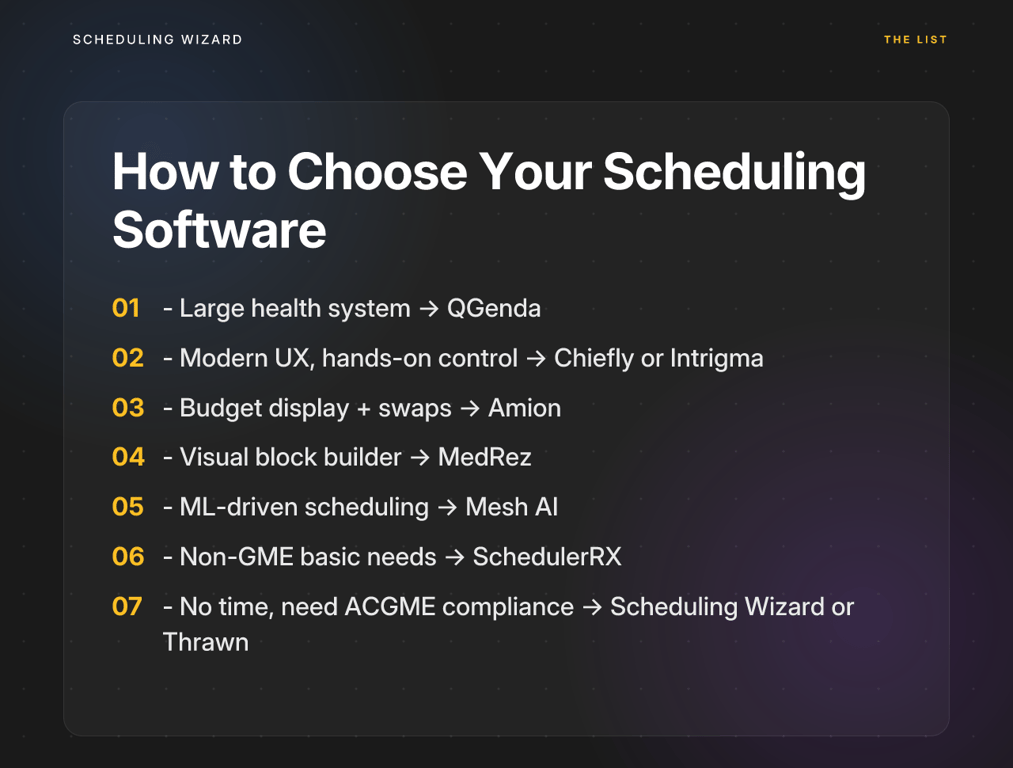
Here's a simple decision matrix:
| Your Situation | Best Fit |
|---|---|
| Large health system, need enterprise scalability | QGenda |
| Want modern UX, willing to operate software yourself | Chiefly or Intrigma |
| Need basic schedule display + shift swapping on a budget | Amion |
| Block schedule focus, visual builder preferred | MedRez |
| Tech-forward program, interested in ML-driven scheduling | Mesh AI |
| Basic scheduling needs, non-GME context | SchedulerRX |
| No time to learn software, need guaranteed ACGME compliance, tired of losing institutional knowledge every July | Scheduling Wizard or Thrawn |
The self-service tools above range from excellent to adequate, and the right one for your program depends on your tech comfort level, institutional size, and how much chief resident bandwidth you're willing to invest. Research consistently shows that optimized scheduling can reduce call variation by 70% and increase resident perception of fairness from 43% to 95% — but only if the tool is actually configured and used correctly.
That's where most self-service platforms fall short in residency settings specifically: the person doing the configuring changes every year, the institutional knowledge resets, and the compliance burden lives entirely with a chief resident who's also, you know, practicing medicine.
If your program lives in that reality, the right tool isn't better software. It's a managed service.
Scheduling Wizard and its partner Thrawn are the only dedicated managed services on this list. You submit your constraints. They deliver finished, ACGME-compliant Block, Call, Clinic, and Attending schedules — as Excel files that plug straight into whatever viewing platform you already use. No ramp-up. No rule-writing. No knowledge cliffs at chief turnover.
If you're ready to stop building schedules and start receiving them, talk to the Scheduling Wizard team.

Frequently Asked Questions
How do you guarantee ACGME compliance for different subspecialties?
A managed service like Scheduling Wizard guarantees ACGME compliance by building the rules directly into its proprietary scheduling engine, not relying on manual user configuration. This mathematical approach ensures that every schedule produced is compliant by design. The engine is pre-configured with the specific duty hour rules for dozens of subspecialties (e.g., Anesthesiology, Surgery, Internal Medicine), including nuanced requirements that are often missed in self-service tools. We also stay ahead of major revisions, like the upcoming 2026 ACGME rule changes.
Does Scheduling Wizard replace our existing Amion or QGenda account?
No, Scheduling Wizard works alongside tools like Amion and QGenda; it does not replace them. We handle the most difficult part of the process: the creation of a fair, optimized, and compliant schedule. We deliver the finished schedule as an Excel spreadsheet that you can directly upload into Amion or QGenda, which you continue to use for day-to-day viewing, shift swaps, and communication. This lets you keep the tools your residents are familiar with while eliminating hundreds of hours of manual building work.
How will the 2026 ACGME rule changes impact our residency schedule?
The 2026 ACGME revisions, particularly counting at-home call toward the 80-hour weekly limit, will significantly tighten scheduling constraints for many programs. This change requires a more sophisticated approach to ensure compliance without compromising patient care or resident well-being. A managed service can model these new constraints and re-optimize your entire schedule to find a compliant solution, saving you the stress of manually rebuilding your templates to fit the new rules.
What is the process of getting a schedule built by a managed service?
The process involves three main steps: submitting your program's specific constraints, receiving a draft schedule for review, and getting a final, ready-to-use schedule. First, you'll provide all your requirements through a structured intake process — this includes rotation rules, individual vacation requests, clinic assignments, and any unique program needs. Our team then uses our optimization engine to generate the schedule. You review the draft, request any tweaks, and we deliver the final version as an Excel file, ready for distribution or upload to your viewing platform.
What happens if we need to make changes to the schedule mid-year?
Mid-year changes, such as unexpected resident leave or rotation adjustments, are handled directly by the Scheduling Wizard team. While you don't have a self-service platform for real-time edits, our service model includes support for revisions. You simply contact our team with the required change, and we will re-run the optimization to find a new compliant solution and deliver an updated schedule. This ensures that even last-minute changes don't cause a cascade of compliance violations.
When should a program choose a managed service over a DIY scheduling tool?
You should choose a managed service if your primary goal is to save time, guarantee ACGME compliance without manual effort, and maintain scheduling continuity despite annual chief resident turnover. DIY tools are a good fit for programs that have dedicated administrative time and want hands-on control. However, if your chief residents are overwhelmed, if you're concerned about rules being configured incorrectly, or if you lose valuable scheduling knowledge every July, a managed service is a more effective and reliable solution. It treats scheduling as a solved problem, not another piece of software to learn.
What types of schedules can Scheduling Wizard create?
Scheduling Wizard can create complex, interdependent schedules for your entire program, including Block, Call, Clinic, and Attending schedules. A key advantage of our engine is its ability to solve these schedules simultaneously. For example, it understands that a resident's block assignment impacts their availability for call and clinic duties. This integrated approach prevents the conflicts and coverage gaps that often arise when schedules are built in separate silos.