Summary
- Residency scheduling is fundamentally different from general staff scheduling due to complex, layered constraints like ACGME rules, rotation sequences, and call equity, which general-purpose tools can't handle.
- The best GME scheduling tools proactively prevent compliance violations rather than just flagging them after the fact. A study in Neurosurgery found automated scheduling reduced call variation by 70%, improving fairness.
- The choice between self-service software and a managed service comes down to who does the scheduling. Self-service tools require a dedicated, permanent administrator, while managed services are built for rotating chief residents.
- For programs relying on rotating chiefs, a managed service like Scheduling Wizard eliminates the operator burden entirely by delivering finished, mathematically guaranteed ACGME-compliant schedules.
You just got handed the chief resident role. Congratulations — now rebuild the entire department schedule from scratch using the same Excel file your predecessor left behind, a file full of unlabeled formulas, color-coded cells no one can explain, and rotation logic that exists only in someone's head who just graduated.
This is the reality for thousands of chief residents every year. And it's why residency program forums are full of threads from chiefs venting that "creating residency schedules in Excel is laborious and frustrating" — not because they're bad at their jobs, but because they've been handed a problem that general-purpose tools simply weren't built to solve.
Residency scheduling isn't just shift scheduling. It's an entirely different category of problem.
General healthcare staff scheduling software is built around filling open slots with available staff. Residency scheduling requires satisfying a layered system of constraints simultaneously: ACGME Common Program Requirements on duty hours, block rotation sequencing, call equity across residents, clinic obligations, subspecialty-specific rules, and resident preferences — all while knowing the person managing all of this changes every single year.
The stakes are real. Duty hour violations don't just create burnout — they put program accreditation at risk. And yet most programs are still running on spreadsheets, manual checks, and institutional memory that walks out the door with every graduating class.
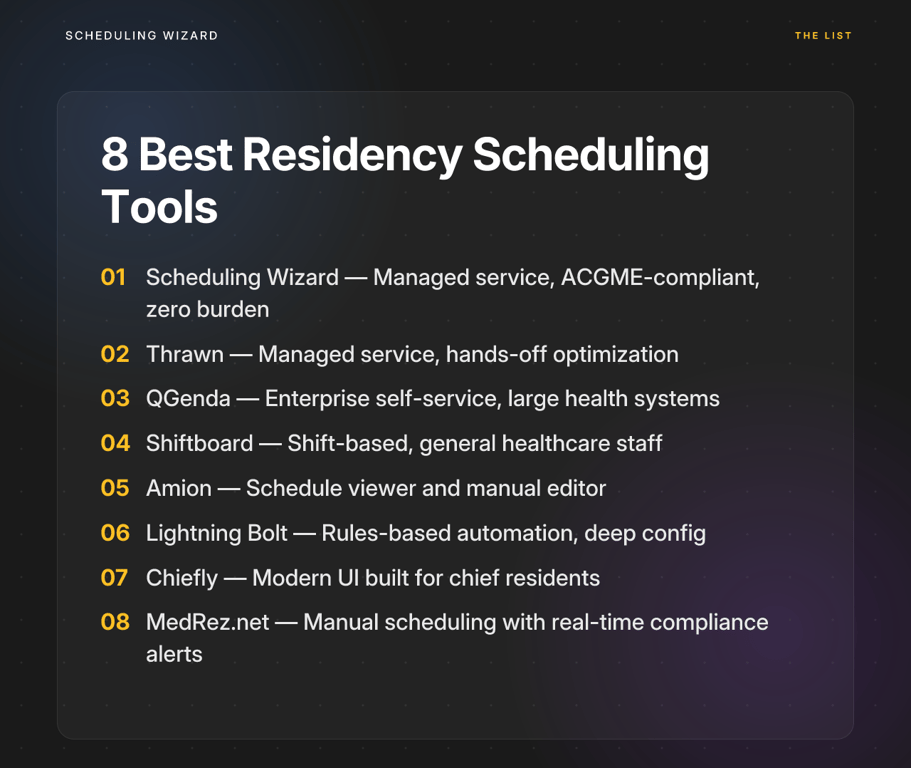
This guide breaks down the 8 best healthcare staff scheduling software options for residency programs — including tools built specifically for GME and general platforms that programs commonly use — so you can find the right fit for your program's needs.
How to Evaluate Residency Scheduling Tools
Before diving into the list, here's what actually matters when evaluating software for a GME context. These three criteria separate tools that were built for residency programs from tools that were simply adapted to them.
1. Compliance Automation Depth
The most important question isn't "does this tool track ACGME duty hours?" Almost all of them claim to. The real question is: does it prevent violations, or does it just flag them after the fact?
Reactive flagging means a chief builds the schedule, the tool identifies violations, and the chief goes back to manually fix them — often creating new violations in the process. Proactive prevention means the scheduling engine builds compliance in from the start, making a non-compliant schedule mathematically impossible to produce. That distinction is the difference between a guardrail and a safety net you fall into anyway.
2. Constraint Handling Complexity
Residency scheduling involves dozens of simultaneous constraints: rotation blocks that must be completed in sequence, call schedules that must be equitable, clinic assignments that can't overlap with certain rotations, conference leave, vacation requests, and subspecialty-specific rules that differ between programs. Ask whether the tool can model all of these — and what happens when constraints conflict. Does it resolve them automatically, or does it surface a list of errors for the administrator to untangle?
3. Administrative Burden on Chief Residents
This is where most self-service scheduling software quietly fails GME programs. A chief resident typically has 1–2 years in the role, competing clinical and educational responsibilities, and no formal training in the software they're expected to master. Heavy platforms that require significant setup time, ongoing configuration, and manual oversight don't reduce the burden — they just relocate it. The question to ask is: does this tool require the chief to become a scheduling expert, or does it remove that requirement entirely?
The 8 Best Healthcare Staff Scheduling Software for Residency Programs
1. Scheduling Wizard
Type: Managed Scheduling Automation Service (Done-for-You) Best For: Residency and fellowship programs that want to eliminate the administrative burden of scheduling entirely while guaranteeing ACGME compliance
Scheduling Wizard is the only option on this list that isn't software — it's a managed service. That distinction matters more than it might initially sound.
Programs submit their constraints (rotations, residents, duty hour rules, preferences, subspecialty requirements) and Scheduling Wizard's proprietary mathematical optimization engine delivers a complete, finished schedule: Block, Clinic, Call, and Attending — all ACGME-compliant, all optimized for fairness and coverage, delivered as a ready-to-use Excel file.
The YC-backed (W26) service, founded in 2024, currently serves 18 departments across 13 hospitals. Its defining advantage isn't a feature — it's a model.
Key Advantages:
- Mathematically guaranteed compliance: The engine doesn't flag violations after the fact. It builds a compliant schedule from the ground up, making non-compliant outputs structurally impossible.
- Zero software learning curve: There is no platform to learn, configure, or maintain. Chief residents submit constraints and receive a finished schedule.
- Institutional continuity across chief rotations: The program's scheduling logic lives with Scheduling Wizard, not in a spreadsheet that a graduating chief takes with them. New chiefs inherit a working system, not a blank file.
- Works alongside existing tools: Many Scheduling Wizard clients use Amion or QGenda for day-to-day schedule viewing. Scheduling Wizard handles creation and optimization; the finished file gets uploaded to whichever viewing platform the department already uses.
- Handles all schedule types: Block/rotation, call, clinic, and attending schedules — with full cross-schedule dependency resolution and resident preference integration.
The managed service model is particularly well-suited for programs where scheduling responsibility falls on a rotating chief rather than a dedicated, permanent administrator. It solves not just the scheduling problem but the knowledge transfer problem that makes residency scheduling so persistently painful.
2. Thrawn
Type: Managed Scheduling Service (Done-for-You) Best For: Programs seeking a hands-off, automated solution for complex block, call, and clinic schedules.
Like Scheduling Wizard, Thrawn operates on a managed service model, positioning itself as a powerful alternative for programs that want to completely offload the complexity of schedule creation. Instead of licensing software, programs provide their specific rules, resident rosters, and constraints, and Thrawn delivers finished block, call, and clinic schedules.
The service leverages advanced optimization algorithms to ensure every schedule is fully ACGME-compliant from the start, equitable for residents, and balanced to meet clinical coverage needs. This "done-for-you" approach eliminates the need for chief residents to spend hundreds of hours manually building and revising schedules in spreadsheets. For programs looking for a hands-off scheduling partner that guarantees compliance and fairness, Thrawn is a compelling choice.
3. QGenda
Type: Self-Service Software (Enterprise) Best For: Large academic medical centers with dedicated administrative staff and system-wide scheduling needs
QGenda is one of the most widely deployed workforce management platforms in healthcare. It's comprehensive, powerful, and built to handle scheduling at scale — across entire health systems, not just individual residency programs.
For GME specifically, QGenda can track duty hours and flag potential ACGME violations. But the operative word is "flag." Resolving those violations requires manual intervention by whoever is managing the platform. It's a reactive compliance model, not a preventive one.
The bigger challenge for residency programs is the operational overhead. QGenda has a significant learning curve and requires substantial time for setup, configuration, and ongoing management. That's manageable when a dedicated, non-rotating administrator owns the platform. It's much harder when the person responsible for scheduling changes every year. Programs that use QGenda successfully typically have a program coordinator or GME administrator who maintains continuity — not the chief resident.
As noted above, Scheduling Wizard clients often use QGenda not for schedule creation but for schedule display — uploading finished schedules to QGenda's interface for day-to-day viewing and access.
4. Shiftboard
Type: Self-Service Software Best For: General healthcare departments managing hourly shift workers who need real-time visibility into staffing
Shiftboard is a flexible, user-friendly platform built around shift-based workforce management. It handles open shift coverage, real-time staff availability, shift swaps, and scheduling visibility well.
For residency programs, the limitation is fundamental: Shiftboard isn't built for GME. It doesn't have native ACGME compliance logic, and configuring it to enforce duty hour rules and rotation constraints would require significant manual setup with a high risk of incomplete or incorrect rule modeling. It's better suited to departments scheduling nurses, techs, or hourly staff than to managing the year-long, multi-layered complexity of a residency block schedule.
5. Amion
Type: Schedule Viewer and Basic Manual Editor Best For: Displaying, sharing, and accessing completed schedules; widely used as a department-level communication tool
Amion is ubiquitous in medicine, and for good reason — it's an excellent tool for what it does. The problem is that what it does is display schedules, not create or optimize them.
There is no compliance automation in Amion. There is no constraint handling. A chief resident must build the entire schedule using another tool or method, manually verify ACGME compliance, and then input the finished product into Amion for the department to access. That workflow puts the full burden of schedule creation on the chief, with no assistance from the platform itself.
This is why Amion functions as a downstream tool in well-run GME programs — something you publish to, not something you build in. Paired with a managed service like Scheduling Wizard, it works well: Scheduling Wizard creates the optimized, compliant schedule; the chief uploads the Excel output to Amion for department-wide visibility.
6. Lightning Bolt by PerfectServe
Type: Self-Service Software with Rules-Based Automation Best For: Departments with complex, variable call patterns and an administrator willing to invest in deep platform configuration
Lightning Bolt uses algorithmic automation to generate schedules based on user-defined rules. It's one of the more powerful self-service options available, particularly for departments where call patterns are highly variable and constraint complexity is high.
The trade-off is setup investment. Lightning Bolt requires the user to define and input all scheduling rules within the platform's rule engine — a process that requires both platform expertise and deep knowledge of your program's specific constraints. Once configured well, it can automate significant portions of schedule generation. But that initial build, and the ongoing expertise required to maintain and update it, still lands on whoever is managing the platform. For a rotating chief resident, that's a steep ask.
7. Chiefly
Type: Self-Service Software Best For: Programs looking for a modern, intuitive interface designed with chief residents in mind
Chiefly takes a different approach from older enterprise platforms — it's built to be approachable for chief residents, with a cleaner UI and a workflow oriented around how chiefs actually think about scheduling.
The design philosophy is its main differentiator. Compared to platforms that feel like enterprise software adapted for GME, Chiefly feels purpose-built for the chief resident experience. It includes duty hour compliance checks and an interface designed to reduce friction in the scheduling process.
That said, it's still a self-service tool. The chief remains responsible for inputting rules, managing requests, handling conflicts, and maintaining the schedule throughout the year. Chiefly lowers the floor for usability, but it doesn't remove the operator burden — it makes it more manageable.
8. MedRez.net
Type: Self-Service Software with Interactive Compliance Feedback Best For: Programs that prefer a hands-on scheduling process but want real-time ACGME guardrails
MedRez.net provides an interface for manual schedule building with real-time alerts that flag duty hour violations before they're finalized. Think of it as a more structured alternative to building schedules in Excel — the compliance feedback is immediate, reducing the risk of violations slipping through.
The limitation is that it's fundamentally still a manual process. The chief builds the schedule block by block, shift by shift, and the tool helps catch errors along the way. It reduces the error rate of manual scheduling without reducing the workload of it. For programs where duty hour compliance has been an ongoing issue but the chief is willing to invest time in hands-on schedule management, it's a reasonable step up from a bare spreadsheet.
The Decision Framework: Managed Service or Self-Service Software?
After reviewing eight tools across the spectrum, the most useful framework for choosing isn't about features — it's about your program's operational reality.
Choose a self-service platform if:
- You have a dedicated, non-rotating program coordinator or GME administrator with protected time to own the tool
- That person has the technical aptitude and institutional continuity to configure and maintain complex scheduling rules year over year
- You need system-wide scheduling visibility beyond a single residency program
Choose a managed service like Scheduling Wizard if:
- Scheduling responsibility falls primarily on a rotating chief resident with competing clinical duties
- Your program has experienced duty hour violations or scheduling inequities that manual processes failed to catch
- Institutional scheduling knowledge is currently tied to individuals rather than a system — meaning it leaves with every graduating class
- You want ACGME compliance that's mathematically guaranteed, not manually checked
The evidence for automation is compelling. A study published in Neurosurgery found that automated scheduling achieved a 70% reduction in call variation compared to manual methods — a meaningful improvement in schedule equity that directly affects resident wellbeing and program culture.
The Bottom Line
If your program runs on Excel templates rebuilt every year by a new chief resident, you don't just need better software — you need a different category of solution entirely.
Self-service scheduling platforms, even good ones, still require someone to become an expert in them, maintain them, and hand them off successfully to the next chief. That's a structural problem no interface improvement fully solves. The institutional knowledge gap, the compliance risk, and the hours lost to manual scheduling recur every single year.
The tools in this list offer a range of approaches. For programs with dedicated administrative infrastructure, certain self-service platforms may be the right fit. For displaying and sharing completed schedules, common viewing tools remain a widely trusted standard. But for residency programs where the chief resident bears the scheduling burden — and where ACGME compliance, call equity, and continuity across annual transitions are non-negotiable — a managed service purpose-built for GME is the most direct path to solving the actual problem.
The goal isn't a slightly better spreadsheet. It's giving your chief residents back the time and headspace to focus on what they trained for: clinical leadership, not logistics.
Frequently Asked Questions
What is the difference between residency scheduling and general staff scheduling?
Residency scheduling involves satisfying complex, layered constraints like ACGME rules, rotation sequences, and clinic requirements simultaneously, whereas general staff scheduling primarily focuses on filling open shifts with available personnel. General tools are built for coverage; residency scheduling tools must be built for compliance, fairness, and educational requirements, making it a fundamentally different and more complex problem to solve.
How can our residency program guarantee ACGME compliance?
The most effective way to guarantee ACGME compliance is to use a system that builds the rules directly into the scheduling logic, making it mathematically impossible to create a non-compliant schedule. This proactive prevention model is superior to reactive flagging, where a tool identifies violations after the fact, forcing the chief resident to make manual corrections that can create new, unforeseen conflicts.
What are the upcoming ACGME rule changes in 2026?
Starting in 2026, the ACGME will count at-home call (pager call) toward the 80-hour weekly work limit and will enforce a hard cap of 24 consecutive hours of work, including call from home. These changes significantly increase the complexity of tracking duty hours, making automated, compliant-by-design scheduling systems more critical for avoiding violations.
Does a service like Scheduling Wizard replace our existing tools like Amion or QGenda?
No, Scheduling Wizard works alongside tools like Amion and QGenda. It replaces the manual creation process by delivering a finished, compliant schedule as an Excel file, which you can then upload to your preferred viewing platform for daily use. Scheduling Wizard handles the complex schedule creation and optimization; Amion and QGenda handle schedule display and communication.
How do scheduling tools handle subspecialty-specific ACGME requirements?
Advanced scheduling solutions, particularly managed services, incorporate subspecialty-specific ACGME rules (e.g., for Surgery, Anesthesiology, or Internal Medicine) directly into their constraint models during the setup process. When evaluating platforms, it's critical to ask whether they can model your specific rules or if you are responsible for manually inputting and maintaining them, as this can be a significant source of error and administrative work.
What is the main advantage of a managed scheduling service over self-service software for a chief resident?
The main advantage is the elimination of administrative burden and the preservation of institutional knowledge. A managed service removes the need for the chief resident to learn software, configure rules, and manually build schedules. It also solves the knowledge transfer problem that occurs when a graduating chief takes their scheduling expertise with them, ensuring continuity and stability for the program year after year.