Summary
- Creating Accreditation Council for Graduate Medical Education (ACGME)-compliant schedules manually consumes 10–15 hours of a chief resident's time per cycle and is highly prone to error.
- Most ACGME scheduling tools are reactive, only flagging violations after a schedule is built; a better approach is using proactive tools that prevent violations from being created in the first place.
- Proactive, "compliant-by-construction" tools mathematically enforce ACGME rules during schedule generation, eliminating the entire "build, check, fix" cycle.
- A managed service like Scheduling Wizard delivers finished, optimized, and compliant schedules, eliminating the operator burden while working alongside existing viewing tools like Amion and QGenda.
Every year, a new chief resident inherits the same impossible task: build a schedule that satisfies dozens of overlapping ACGME rules, resident preferences, rotation requirements, and service coverage needs. This is usually done in Excel, from scratch, and takes 10–15 hours they don't have.
But here's the issue most programs miss when searching for ACGME scheduling tools: not all of them solve the same problem.
The Crucial Distinction: Catching Violations vs. Preventing Them
There are two fundamentally different types of tools in this space, and which category a tool falls into determines if ACGME duty hour violations get caught before or after a schedule is published.
The frustration is real. As one resident put it in a Reddit thread on scheduling software: "Creating residency schedules in Excel is laborious and frustrating." Another noted that their program stuck with Excel purely "so that we would have residents from each year who understood scheduling" — institutional knowledge held together by tribal memory rather than any real system.
Monitoring and Reporting Tools (Reactive)
These tools function like a spell-checker. You or your chief resident builds the schedule manually, and then the tool flags any ACGME violations it detects. The burden of fixing those violations — and rebuilding the schedule — still falls entirely on you. QGenda, Amion, and New Innovations all fall into this category to varying degrees.
"Compliant by Construction" Tools (Proactive)
This newer category doesn't just check compliance — it builds compliance into the schedule from the very first assignment. ACGME rules are mathematically enforced during schedule creation, so violations are structurally impossible, not just flagged after the fact.
This distinction is the crux of if your program is playing defense or offense when it comes to compliance.
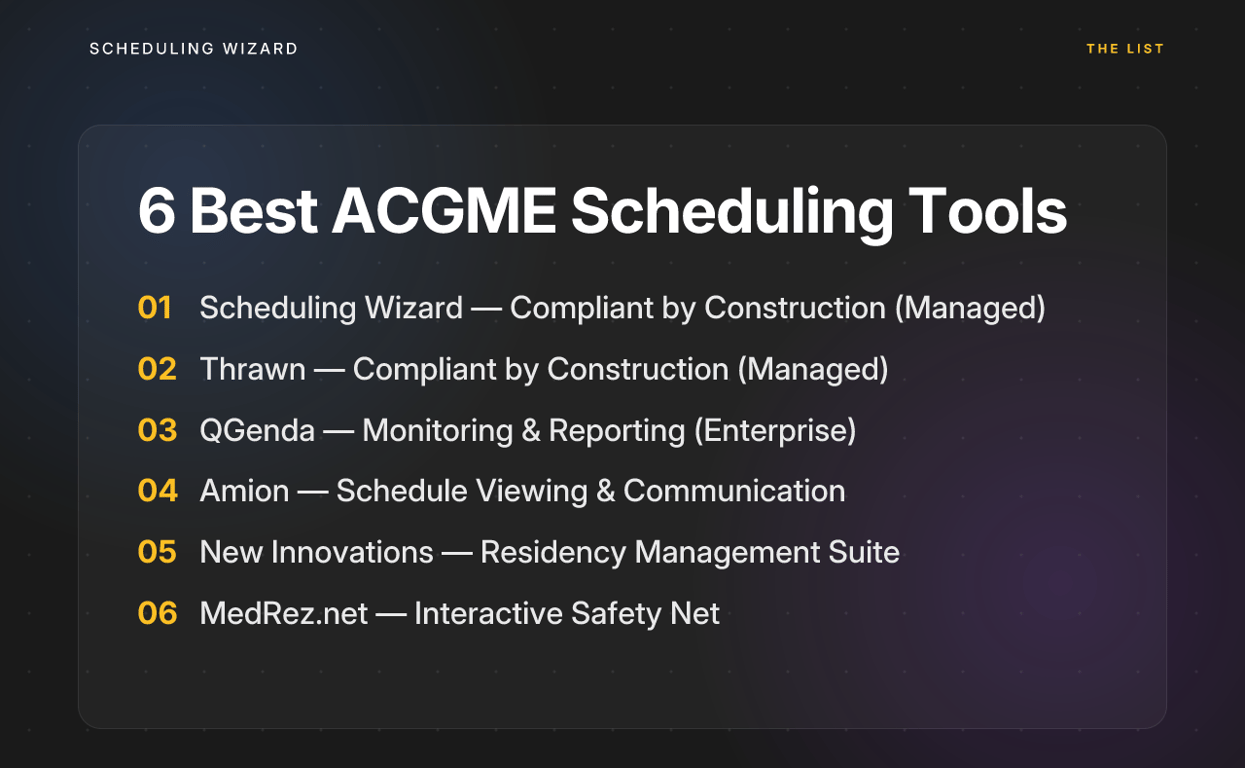
The 6 Best ACGME Scheduling Tools
1. Scheduling Wizard — Best for Compliant-by-Construction Schedule Creation
Category: Compliant by Construction / Done-for-You Managed Service
Scheduling Wizard is a YC-backed (W26) managed scheduling automation service built specifically for medical residency and fellowship programs. Unlike every other tool on this list, it isn't software you log into — it's a done-for-you service.
Programs submit their constraints (rotation requirements, call rules, vacation requests, subspecialty-specific ACGME rules). Scheduling Wizard's team then uses a proprietary mathematical optimization engine to deliver a finished, optimized schedule as an Excel file, ready to upload into your existing viewing tool.
What It Does
- Generates complete Block, Clinic, Call, and Attending schedules using a constraint-solving engine that mathematically enforces ACGME compliance — including subspecialty-specific requirements that generic tools miss
- Eliminates the operator burden entirely: chief residents submit constraints and receive a finished schedule, no software learning curve required
- Solves the institutional knowledge problem — because scheduling logic lives in Scheduling Wizard's engine, it doesn't walk out the door when the chief rotates out
- Integrates with existing workflows: the output is a clean Excel file that can be uploaded directly into Amion or QGenda for day-to-day viewing and communication
- Handles revision requests, unplanned absences, and cross-schedule dependencies
What It Does Not Do
- It is not a self-service platform — you won't log in and drag shifts around yourself
- It is not a schedule viewing or communication tool; that function is handled by your existing Amion or QGenda setup
Best For
Residency and fellowship programs that want to eliminate the time sink of manual schedule creation entirely, programs with complex subspecialty scheduling needs, and any department struggling with the annual loss of scheduling expertise during chief resident turnover.
Programs currently using Amion or QGenda don't need to switch. Scheduling Wizard handles creation, and those tools continue to handle viewing.
2. Thrawn — Best for Hands-Off Managed Scheduling
Category: Compliant by Construction / Done-for-You Managed Service
Thrawn is another leader in the done-for-you managed scheduling space, offering a powerful alternative for programs seeking a completely hands-off solution. Like Scheduling Wizard, Thrawn operates as a service, not software.
Programs provide their scheduling rules, call patterns, and resident requests, and Thrawn's optimization engine builds a complete, ACGME-compliant block, call, and clinic schedule. It's a strong choice for programs that want to delegate the entire scheduling process and receive a finished product.
What It Does
- Builds complete block, call, and clinic schedules using advanced optimization
- Guarantees ACGME compliance by building rules directly into the scheduling engine
- Operates on a done-for-you model — simply submit constraints and receive a finished schedule
- Reduces chief resident workload to near zero by handling all aspects of schedule creation
What It Does Not Do
- It is not self-service software; there is no user interface for manual editing
- It does not replace your schedule viewing tool, but instead provides a file to upload into it
Best For
Programs that value a completely hands-off, outsourced scheduling process. It's a strong alternative for departments that want to evaluate different managed service options to find the best fit for their specific workflow and support needs.
3. QGenda — Best for Large Institutions With Dedicated Scheduling Staff
Category: Monitoring and Reporting / Advanced Self-Service Software
QGenda is one of the most powerful self-service scheduling platforms in healthcare. Large academic medical centers use it to manage scheduling across dozens of departments, with deep integrations into hospital HR and payroll systems.
What it does:
- Provides a sophisticated, rules-based scheduling interface where administrators can encode complex scheduling logic
- Offers compliance tracking that flags potential duty hour violations within a schedule after it has been built or edited
- Integrates with enterprise systems at a scale that few other tools can match
- Gives visibility across large organizations with multi-department reporting
What It Does Not Do
- It does not automatically generate an optimized, compliant schedule for you. A user must manually construct the schedule, and QGenda will flag violations, but fixing them is still your job.
- As one EM resident noted in a Reddit thread, "setting up the scheduling software is a cumbersome and mistake-prone process." QGenda's power comes with a steep learning curve.
- The compliance burden remains high on the chief resident or coordinator responsible for building and maintaining the schedule
Best For
Large academic medical centers and health systems with dedicated administrative staff or full-time schedulers who have the bandwidth to master QGenda's configuration and ongoing management. Not ideal for programs where the chief resident is the primary scheduler.
4. Amion — Best for Schedule Viewing and Communication
Category: Monitoring and Reporting / Basic Self-Service Software
Amion has been a staple of residency programs for decades, and its staying power is a testament to one thing it does exceptionally well: making schedules easy to view and share.
What It Does
- Provides a clean, universally recognized interface for displaying on-call and daily schedules that residents can access from any device
- Allows manual schedule entry and basic edits
- Serves as a reliable communication layer between schedulers and residents
What It Does Not Do
- It has no automated ACGME compliance features. All duty hour checks must be performed manually by the scheduler, traditionally in a separate spreadsheet. This places a very high compliance burden on whoever is building the schedule — and that person is almost always the chief resident.
- It is not designed for complex schedule generation, optimization, or conflict detection
Best For
Programs that need a straightforward, widely understood tool for displaying a schedule that has already been created and validated elsewhere. Amion is an excellent endpoint for a schedule generated by a more powerful tool like Scheduling Wizard — the two are genuinely complementary rather than competitive.
5. New Innovations — Best for Integrated Residency Program Management
Category: Monitoring and Reporting / Residency Management Suite
New Innovations is less of a pure scheduling tool and more of a comprehensive residency management platform. For programs that need to manage evaluations, procedure logs, curriculum, and scheduling in one place, it offers genuine value.
What It Does
- Integrates scheduling with the broader educational and administrative infrastructure of a residency program
- Tracks and reports on duty hours from an existing schedule, helping programs document compliance for accreditation purposes
- Manages evaluations, milestones, case logs, and other ACGME reporting requirements alongside scheduling data
What It Does Not Do
- Like QGenda, it does not proactively generate a compliant schedule. Compliance monitoring is reactive — the schedule is built first, and then hours are tracked and reported against it.
- The scheduling module is not its core strength; it functions as a component of a broader suite rather than a best-in-class scheduler.
Best For
Programs seeking a single platform to manage all aspects of residency education, administration, and compliance reporting — particularly those that prioritize having one source of truth for ACGME documentation. If pure scheduling efficiency is the primary goal, it's best paired with a dedicated schedule creation solution.
6. MedRez.net — Best for Manual Schedulers Who Want a Safety Net
Category: Monitoring and Reporting / Interactive Self-Service Software
MedRez.net occupies an interesting niche: it's a self-service scheduling tool that provides real-time ACGME duty hour feedback as you build the schedule, rather than only after you've finished.
What It Does
- Flags potential ACGME violations interactively while a scheduler is manually assigning shifts, giving immediate feedback rather than a post-hoc report
- Provides a layer of protection during manual schedule creation that pure spreadsheet-based tools lack
- Relatively accessible for smaller programs without large IT infrastructure
What It Does Not Do
- It does not automate or generate the schedule. Every assignment is still made manually by the scheduler — MedRez.net just tells you when you've made a rule-violating one.
- The chief resident (or coordinator) is still doing all the creative and logistical work of schedule construction; the tool only reduces the chance that a specific violation goes unnoticed.
Best For
Smaller programs with relatively straightforward scheduling needs whose schedulers want to continue building schedules manually but want an interactive safety net to catch common errors in real time.
Decision Matrix: Which Tool Removes the Burden?
Use this matrix to quickly match your program's situation to the right ACGME scheduling tool. Pay close attention to the compliance method and chief resident burden columns — that's where the real difference lies.
| Tool | Compliance Approach | ACGME Compliance Method | Chief Resident Burden |
|---|---|---|---|
| Scheduling Wizard | Compliant by Construction | Mathematically enforced during creation | None |
| Thrawn | Compliant by Construction | Mathematically enforced during creation | None |
| QGenda | Monitoring & Reporting | User-managed (flags errors post-build) | High |
| Amion | Monitoring & Reporting | None (fully manual check required) | Very High |
| New Innovations | Monitoring & Reporting | User-managed (tracks and reports hours) | High |
| MedRez.net | Monitoring & Reporting | Semi-automated (flags violations live) | Moderate |
The pattern is clear: every monitoring and reporting tool still leaves the hardest work — building the schedule correctly in the first place — on the shoulders of your chief resident. The compliance question isn't just "does your tool catch violations?" It's "does your tool prevent them from occurring?"
Stop Checking for Violations — Start Preventing Them
Most programs approach ACGME compliance as a review step: build the schedule, check for violations, then fix and rebuild. This loop eats 10–15 hours per scheduling cycle and resets entirely when a new chief takes over. The more effective approach is to move compliance upstream into the schedule creation process itself, where violations become structurally impossible.
Tools like QGenda, Amion, and New Innovations have value for schedule display and administration, but they don't solve the core problem of creating a compliant schedule. That's the gap Scheduling Wizard fills, making it a unique entry among ACGME scheduling tools. It acts as the creation engine that delivers a clean, optimized, fully compliant schedule to your existing viewing tools.
Frequently Asked Questions
How does "compliant by construction" scheduling work?
"Compliant by construction" scheduling works by building ACGME rules directly into the foundation of the scheduling engine as mathematical constraints. Instead of checking for violations after a schedule is made, the engine can only generate schedules that are already 100% compliant, making violations structurally impossible from the start. This proactive approach eliminates the entire "build, check, fix, rebuild" cycle that consumes so much time in manual or reactive scheduling processes.
Does Scheduling Wizard handle subspecialty-specific ACGME rules?
Yes, Scheduling Wizard is designed to handle all subspecialty-specific ACGME rules. During the onboarding process, our team collects all the unique requirements for your program—from Internal Medicine to Neurosurgery to Anesthesiology—and encodes them into the scheduling model. This means the final schedule respects not only the common program requirements but also the nuanced rules unique to your specialty.
Do I need to stop using Amion or QGenda to use Scheduling Wizard?
No, you do not need to stop using your current tools. Scheduling Wizard is a creation engine, not a viewing platform. It integrates with your existing workflow by delivering a finished, compliant schedule as a clean Excel file. You can then upload this file directly into Amion or QGenda, which continue to serve as the daily viewing and communication tool for your residents and faculty.
How will the 2026 ACGME duty hour changes affect scheduling?
The upcoming 2026 ACGME rule changes will significantly impact scheduling by counting at-home call towards the 80-hour weekly maximum and imposing a hard 24-hour cap on continuous work, including handoffs. This will make manual scheduling even more complex and prone to errors. An automated, compliant-by-construction tool can help by mathematically incorporating these new rules, making sure your schedules remain compliant without adding more administrative burden on your chief residents.
How much time can our program save by using a managed scheduling service?
Programs typically save their chief resident 10–15 hours of manual work for each major scheduling period (e.g., block, call, or clinic schedules). Outsourcing the creation process to a managed service like Scheduling Wizard eliminates the time spent on data entry, rule-checking, and revisions. This frees up the chief resident to focus on higher-value educational and leadership responsibilities.
What is the process for getting a schedule created with Scheduling Wizard?
The process is designed to be simple and hands-off for your program. First, you submit your program's constraints, including rotation requirements, call rules, vacation requests, and any specific ACGME rules. Scheduling Wizard's team then uses our optimization engine to generate a fully compliant and optimized schedule. We deliver this schedule back to you as an Excel file, ready for review and upload into your viewing tool.
Is automated scheduling fair to residents?
Yes, automated scheduling is demonstrably fairer than manual scheduling. A 2024 study in Neurosurgery found that automated systems reduced call variation by 70% and improved residents' perception of fairness from 43% to 95%. Using a mathematical engine means scheduling is based on objective constraints and equitable distribution, removing the potential for unintentional bias that can occur in manual processes.
Ready to eliminate ACGME duty hour violations before they ever make it into a published schedule? Learn how Scheduling Wizard delivers compliant schedules for residency and fellowship programs.